Tutorial: build an issue tracker
A hands-on tour of situ. Over six short parts you will build a working mini issue tracker: a live-searchable list, shareable status filters, a selection-driven detail pane, and server commands that close, reopen, and create issues. Each part introduces exactly one idea, and every listing compiles and runs — the finished app's entire client is a generated island of about 6.8 KB, with zero hand-written JavaScript.
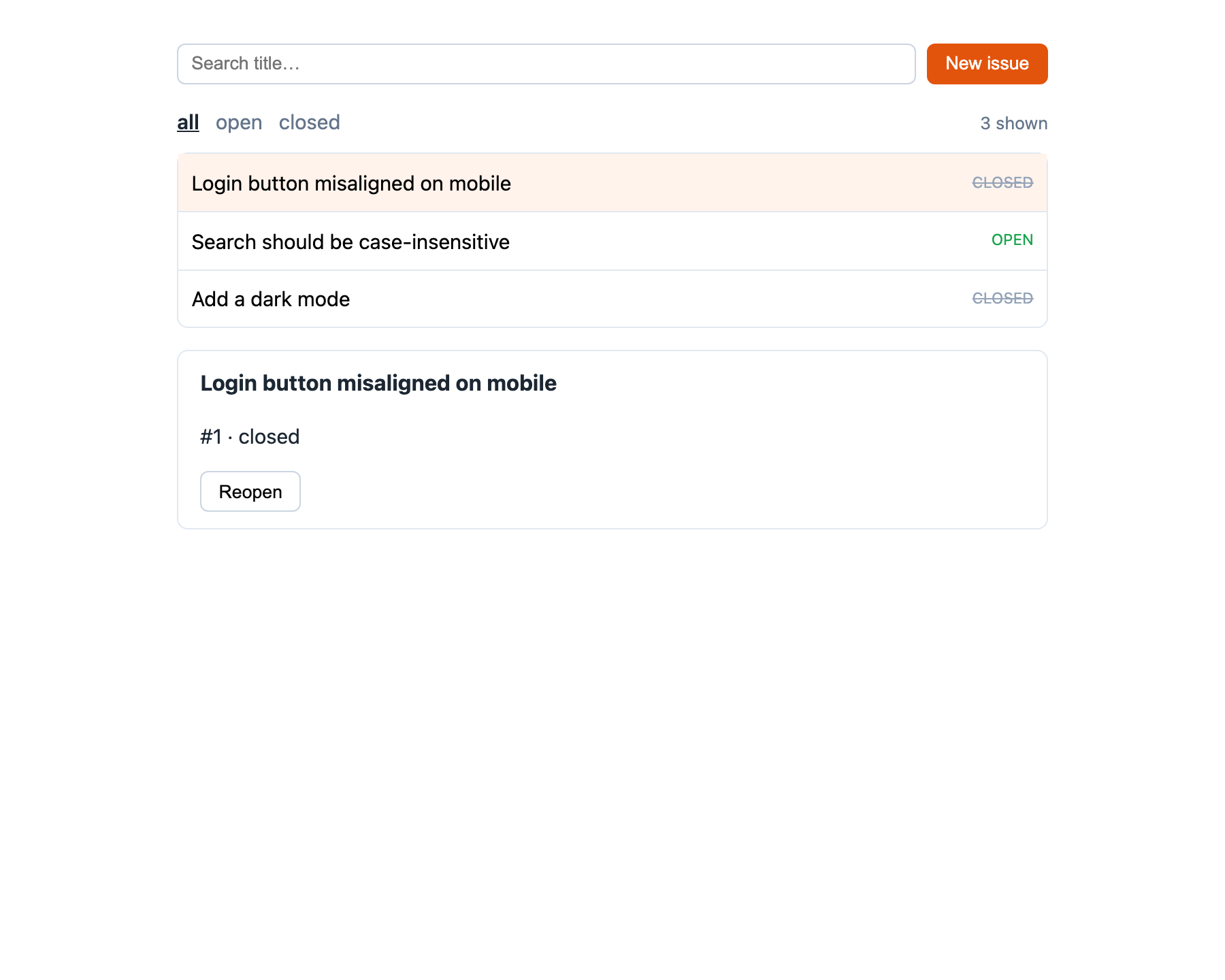
The arc
| Part | You add | You learn |
|---|---|---|
| 1. A server-rendered list | rows from a store | the Server site, context(), the mount, the region |
| 2. Live search | a filter-as-you-type box | the Local site, :bind/:show, zero-network reactivity, the seam |
| 3. Shareable filters | all / open / closed tabs | the Url site and its trade-off |
| 4. Selection & detail | a click-to-open pane | client selection, the data-id row idiom |
| 5. Commands | Close / Reopen buttons | await ⇒ POST, path args, region swaps |
| 6. The create dialog | New issue | forms, reset(), the <header> rule |
Time: roughly 45 minutes. Prerequisites: Python ≥ 3.12 and situ installed; the Quickstart is a useful five-minute warm-up but optional.
Set up the project
Create the layout (four source files across four directories):
tracker/
  app.py                 # the mount + DI wiring        (part 1)
  store.py               # the domain service           (below)
  components/
    tracker.py           # sited signals + handlers     (parts 1–6)
    tracker.html         # the template                 (parts 1–6)
  templates/
    page.html            # page chrome                  (below)
and install the two runtime dependencies into a fresh environment:
The store
An in-memory domain service. It will play two roles for the mount: the DI service_type (resolved per request) and the facade whose async methods the server handlers await. Swap in situ.infra.db + SQLAlchemy later; nothing else changes.
from __future__ import annotations

from dataclasses import dataclass


@dataclass
class Issue:
    id: int
    title: str
    status: str = "open"  # open | closed


class IssueStore:
    def __init__(self) -> None:
        self._items = [
            Issue(1, "Login button misaligned on mobile"),
            Issue(2, "Search should be case-insensitive"),
            Issue(3, "Add a dark mode", status="closed"),
        ]
        self._next = 4

    async def create(self, title: str) -> None:
        title = title.strip()
        if title:
            self._items.append(Issue(self._next, title))
            self._next += 1

    async def set_status(self, issue_id: int, status: str) -> None:
        for t in self._items:
            if t.id == issue_id:
                t.status = status

    def visible(self, which: str) -> list[Issue]:
        if which == "all":
            return list(self._items)
        return [t for t in self._items if t.status == which]
The page template
situ ships a minimal default page; this is that page plus a screen of CSS so the app looks like something. The three <script> lines are the entire client wiring: the signal bootstrap, the shared shim, and this mount's generated island.
<!doctype html>
<html lang="en">
<head>
  <meta charset="utf-8">
  <meta name="viewport" content="width=device-width, initial-scale=1">
  <title>{{ demo.name | default("situ") }}</title>
  <script type="application/json" id="siting-signals">{{ client_init | tojson }}</script>
  <script defer src="/static/_rt.js"></script>
  <script defer src="{{ island_url }}"></script>
  <style>
    /* :show toggles the `hidden` attribute; keep it winning over any `display:` we set below */
    [hidden] { display: none !important; }
    body { font: 15px/1.5 system-ui, sans-serif; max-width: 40rem; margin: 2rem auto; color: #1c2733; }
    header { display: flex; gap: .5rem; flex-wrap: wrap; margin-bottom: 1rem; }
    header input { flex: 1; }
    input { padding: .4rem .6rem; border: 1px solid #cbd5e1; border-radius: 6px; }
    button { padding: .4rem .8rem; border: 1px solid #cbd5e1; border-radius: 6px; background: #fff; cursor: pointer; }
    button.primary { background: #e2540c; border-color: #e2540c; color: #fff; }
    nav { display: flex; gap: .75rem; align-items: baseline; margin-bottom: .75rem; }
    nav a { color: #64748b; text-decoration: none; }
    nav a.selected { color: #1c2733; font-weight: 600; text-decoration: underline; }
    nav .count { margin-left: auto; color: #64748b; font-size: .85em; }
    .issue-list { list-style: none; padding: 0; margin: 0 0 1rem; border: 1px solid #e2e8f0; border-radius: 8px; }
    .issue-list li { display: flex; align-items: center; gap: .5rem; padding: .35rem .6rem; border-bottom: 1px solid #e2e8f0; }
    .issue-list li:last-child { border-bottom: 0; }
    .issue-list li.selected { background: #fff3ec; }
    .issue-list button { border: 0; background: none; padding: .25rem 0; font: inherit; }
    .status { margin-left: auto; font-size: .75em; text-transform: uppercase; color: #16a34a; }
    .status.closed { color: #94a3b8; text-decoration: line-through; }
    .detail > div { border: 1px solid #e2e8f0; border-radius: 8px; padding: .75rem 1rem; }
    .detail h2 { margin: 0 0 .25rem; font-size: 1.05em; }
    .dialog { flex-basis: 100%; }
    .dialog form { display: flex; gap: .5rem; }
    .dialog input { flex: 1; }
  </style>
</head>
<body>
  {{ body | safe }}
</body>
</html>
Keep the [hidden] rule
situ's :show binder hides an element by setting its hidden attribute. The browser's built-in [hidden] { display: none } loses to any author display: on the same element — and this stylesheet sets display: flex on rows. The first rule in the block keeps hidden winning. If rows ever refuse to disappear in your own apps, this is the first thing to check.
Setup done — on to Part 1: a server-rendered list.